










 (+1) 905 597 5955



How Many High Bay Lights Do I Need?
50 lumens per square foot. That’s the number most people start with for warehouse lighting. And honestly? It’s wrong about half the time.
Here’s the thing. A high bay lighting calculator is only as good as the inputs you feed it. Get your foot-candle requirements wrong, pick the wrong beam angle, or ignore your ceiling height, and you end up with dark spots, wasted fixtures, or both. Either way, it costs you money.
The actual lumens-per-square-foot requirement for high bay spaces ranges from 30 to 100+ depending on what happens in that space. A basic storage warehouse needs maybe 30-50. A manufacturing floor with detailed assembly work? That’s 75-100. And a quality inspection area might need 100+.
So before you plug numbers into any high bay light calculator, you need to know three things: your square footage, your required foot-candle level, and your mounting height. Get those right, and the math is straightforward.
Let’s walk through it.
Quick Reference: Lumens Per Square Foot by Application
| Space Type | Foot-Candles (IES Recommended) | Lumens/Sq Ft Needed |
| General Warehouse Storage | 30 | 30-40 |
| Distribution Centre | 50 | 50-60 |
| Manufacturing (General) | 50-75 | 50-80 |
| Manufacturing (Detailed) | 75-100 | 80-110 |
| Workshop / Maintenance | 50-75 | 50-80 |
| Retail Big Box | 50-70 | 50-75 |
| Gymnasium / Recreation | 50-75 | 50-80 |
| Quality Inspection | 100+ | 100-120 |
| Cold Storage | 30-50 | 35-55 |
| Automotive Service Bay | 75-100 | 80-110 |
Values based on IES (Illuminating Engineering Society)recommended light levels. Actual requirements vary by task specificity.
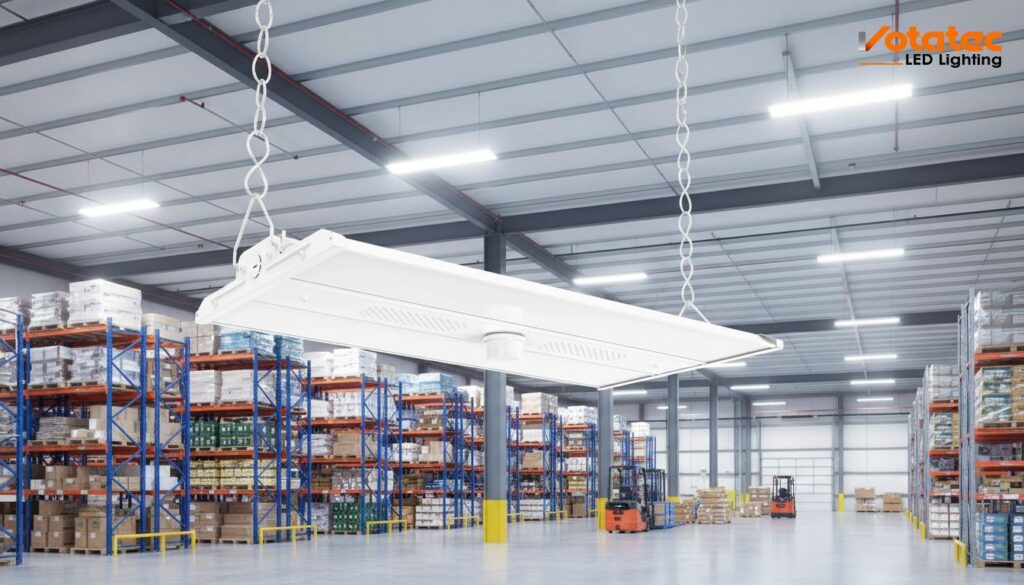
How Many High Bay Lights Do I Need? The Quick Formula
This is the question everyone asks first. And the answer comes down to a simple formula that any electrical contractor or facility manager can use.
The Formula:
Number of Fixtures = (Square Footage × Required Foot-Candles) ÷ Lumens Per Fixture
That’s it. Pretty simple.
But let’s actually work through it so you can see how it plays out in a real building.
Example: 25,000 sq ft warehouse, general storage, 20-foot ceilings
- Square footage: 25,000
- Required foot-candles: 30 (general storage per IES standards)
- Total lumens needed: 25,000 × 30 = 750,000 lumens
- Chosen fixture: 200W LED high bay producing 30,000 lumens
- Number of fixtures: 750,000 ÷ 30,000 = 25 fixtures
So you’d need roughly 25 fixtures. Make sense?
Now here’s where most people mess up. That formula gives you a starting point, not a final answer. You still need to account for a few real-world factors.
Light Loss Factor (LLF). Over time, LED output drops slightly and dust accumulates on fixtures. Industry standard is to multiply your total lumens needed by 1.25 to account for this. So that 750,000 becomes 937,500, which bumps your fixture count to about 31-32.
Beam angle matters too. A 60-degree beam angle concentrates light in a tighter cone, great for higher ceilings but you’ll need more fixtures to avoid dark spots between them. A 120-degree beam spreads light wider, good for lower ceilings with closer spacing.
Reflectance. Dark floors and walls absorb more light. If your warehouse has dark concrete floors and unpainted steel walls, add another 10-15% to your fixture count. Light-coloured surfaces bounce light around and improve uniformity.
So how many high bay lights do I need? For that 25,000 sq ft warehouse, the real answer is probably 30-35 fixtures once you account for light loss, beam angle, and reflectance. Not the 25 the basic formula suggests.
Always round up. Dark spots are a liability. A couple extra fixtures are cheap insurance.
Read more: Benefits of Switching to High Bay LED Lights for Your Business
High Bay Lighting Layout Calculator: Spacing by Ceiling Height
Knowing how many fixtures you need is step one. Step two is figuring out where to put them. And that’s where a high bay lighting layout calculator becomes essential.
Spacing depends heavily on mounting height. The general rule is this:
Spacing-to-Height Ratio (SHR) = spacing between fixtures ÷ mounting height above floor
For most LED high bays, the ideal SHR falls between 1.0 and 1.5. Anything above 1.5 and you start getting uneven light with dark patches between fixtures. Anything below 1.0 and you’re probably over-lighting the space and wasting money.
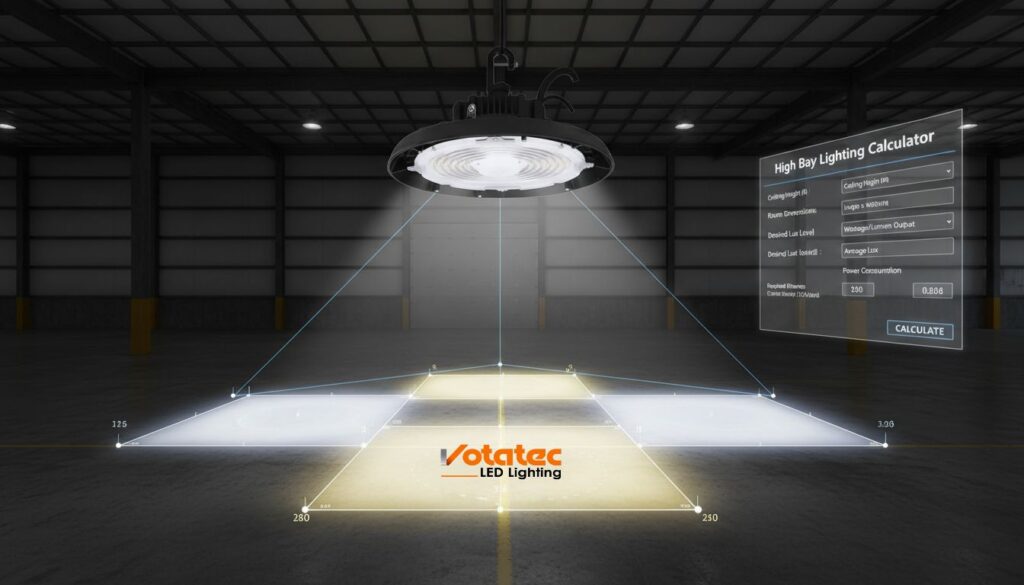
Spacing Table by Mounting Height:
| Mounting Height | Recommended Spacing | Typical Wattage | Lumens Output |
| 15 ft (4.5m) | 12-15 ft apart | 100-150W | 15,000-22,000 |
| 20 ft (6m) | 15-18 ft apart | 150-200W | 22,000-30,000 |
| 25 ft (7.5m) | 18-22 ft apart | 200-240W | 30,000-36,000 |
| 30 ft (9m) | 20-25 ft apart | 240-320W | 36,000-48,000 |
| 35 ft (10.5m) | 22-28 ft apart | 320-400W | 48,000-60,000 |
| 40 ft+ (12m+) | 25-30 ft apart | 400-500W | 60,000-75,000 |
Here’s a practical tip. When you’re laying out a grid, measure from the wall to your first fixture at half the spacing distance. So if your fixtures are 20 feet apart, the first row should be 10 feet from the wall. This prevents the dark perimeter that makes warehouses feel smaller than they are.
And another thing. Aisle-oriented layouts in warehouses, where fixtures are centred over aisles rather than in a uniform grid, often provide better usable light on the floor where pickers actually work. It’s a small change that makes a big difference in functional light levels.
LED High Bay Lumen Calculator: How Much Light Do You Actually Need?
Lumens cause confusion. So let’s clear it up.
A lumen is a unit of total light output from a fixture. A foot-candle is one lumen spread over one square foot of surface. Your LED high bay lumen calculator needs to work in foot-candles first, then convert to total lumens needed.
Here’s why that matters. A 30,000-lumen fixture at 20-foot mounting height doesn’t deliver 30,000 lumens to the floor. Some light is absorbed by the air, reflected off surfaces, or directed outside the useful area by the beam angle. The actual delivered foot-candles at floor level might be 60-70% of the theoretical maximum.
Lumen requirements by application type:
| Application | Min. Foot-Candles | Lumens/Sq Ft (with LLF) | 10,000 Sq Ft Total |
| Basic Storage | 30 | 37-45 | 375,000-450,000 |
| Active Warehouse | 50 | 62-75 | 625,000-750,000 |
| Manufacturing | 75 | 93-110 | 937,000-1,100,000 |
| Detail/Inspection | 100 | 125-150 | 1,250,000-1,500,000 |
| Workshop | 50-75 | 62-93 | 625,000-937,000 |
The “with LLF” column is what you actually need to specify. Not the raw number. A lot of contractors learn this the hard way when a client complains about dim lighting two years after installation because the maintenance factor wasn’t built into the original design.
If you’re using a workshop lighting calculator for a smaller space like a maintenance shop or fabrication area, the same principles apply. Just scale down. A 2,000 sq ft workshop at 50 foot-candles needs about 125,000-150,000 total lumens including light loss factor.
LED High Bay Wattage Calculator: Matching Power to Your Space
Once you know your lumen requirement, an LED high bay wattage calculator helps you pick the right fixture size. And this is where LED efficiency ratings matter.
Modern LED high bays produce between 130-180 lumens per watt. That’s a wide range. A budget fixture at 130 lm/W needs more wattage to hit the same output as a premium fixture at 170 lm/W. The premium fixture costs more upfront but uses less energy over its lifetime.
Wattage Selection Guide:
| Space/Ceiling | Lumens Needed Per Fixture | At 130 lm/W | At 150 lm/W | At 170 lm/W |
| 15 ft, basic | 15,000-20,000 | 115-155W | 100-135W | 90-120W |
| 20 ft, warehouse | 25,000-30,000 | 190-230W | 165-200W | 145-175W |
| 25 ft, industrial | 30,000-40,000 | 230-310W | 200-265W | 175-235W |
| 30 ft, heavy duty | 40,000-50,000 | 310-385W | 265-335W | 235-295W |
| 35 ft+, extreme | 50,000-65,000 | 385-500W | 335-435W | 295-385W |
The takeaway? Higher efficacy fixtures let you use lower wattages, which means lower electricity costs, lower heat output, and smaller electrical circuit requirements. For a 100-fixture warehouse, choosing 150 lm/W fixtures over 130 lm/W might save $3,000-5,000 per year in energy costs. Over 10 years, that’s significant.
Also worth knowing: your led high bay lighting calculator should factor in your local electricity rate. In Ontario, commercial rates average $0.12-0.14/kWh. In BC, around $0.09-0.11/kWh. In Quebec, as low as $0.07/kWh. These differences change the payback math considerably.
Warehouse LED Lighting Calculator: Coverage for Common Sizes
Let’s skip the theory and get to pre-calculated layouts. Because most contractors and facility managers want a quick reference they can use for quoting purposes.
These warehouse LED lighting calculator estimates assume general warehouse storage at 50 foot-candles, 20-foot ceiling heights, and fixtures rated at 150 lm/W with 30,000 lumens output. Adjust up for higher ceilings or more demanding tasks.
Pre-Calculated Warehouse Layouts:
| Warehouse Size | Total Lumens Needed (with LLF) | Fixtures Needed | Grid Layout | Estimated Annual Energy Cost* |
| 5,000 sq ft | 312,500 | 10-12 | 3×4 or 2×6 | $1,050 |
| 10,000 sq ft | 625,000 | 20-22 | 4×5 or 5×5 | $2,100 |
| 25,000 sq ft | 1,562,500 | 50-55 | 7×8 or 8×7 | $5,250 |
| 50,000 sq ft | 3,125,000 | 100-110 | 10×10 or 10×11 | $10,500 |
| 100,000 sq ft | 6,250,000 | 200-215 | 14×15 or 15×14 | $21,000 |
*Annual cost based on 200W fixtures, 4,000 operating hours, $0.13/kWh
These are estimates. Every building has unique conditions. But they give you a ballpark that’s close enough for initial budgeting and client conversations.
Commercial LED Lighting Calculator for Offices and Retail
High bays aren’t just for warehouses. Big box retail, gymnasiums, indoor sports facilities, and large open-plan offices all use high bay or high-output fixtures at ceiling heights between 15 and 25 feet.
A commercial LED lighting calculator for these spaces uses the same formula but with different foot-candle targets. Retail needs higher light levels and better colour rendering (CRI 90+) to make products look appealing. Gyms need uniform coverage with minimal glare for player safety. Open offices need glare-free, even illumination with 4000K colour temperature.
Commercial application quick reference:
| Commercial Space | Foot-Candles | CRI Minimum | Colour Temp | Fixtures per 10K Sq Ft |
| Big Box Retail | 50-70 | 90+ | 4000-5000K | 25-35 |
| Gymnasium | 50-75 | 80+ | 5000K | 25-30 |
| Indoor Arena | 75-100 | 80+ | 5000K | 30-40 |
| Large Open Office | 40-50 | 80+ | 4000K | 20-25 |
| Exhibition Hall | 50-75 | 90+ | 4000K | 25-35 |
UFO high bay fixtures, the round disc-shaped ones you see everywhere now, are popular in commercial applications because they’re compact, lightweight, and produce uniform light without bulky reflectors. If you’re using a UFO high bay light calculator, the same lumen and spacing math applies. Just confirm the beam angle, since UFO fixtures typically come in 90-degree or 120-degree options.
Industrial LED Lighting Calculator for Heavy-Duty Facilities
Industrial environments push lighting requirements further. Manufacturing plants, foundries, food processing facilities, and automotive plants need higher foot-candles, tougher fixtures, and often specialized optics.
An industrial LED lighting calculator has to account for things that don’t exist in a clean warehouse. Vibration from heavy machinery. Airborne particulates that coat fixtures and reduce output. Extreme temperatures in foundries or cold storage. Wet washdown environments in food processing.
Industrial lighting considerations:
- Vibration resistance: Choose fixtures with solid-state LED drivers rated for high vibration. No glass, no filaments. This is where LED dominates traditional lighting.
- IP rating: Wet areas need IP65 minimum. Washdown environments need IP66 or IP67. Your industrial lighting layout calculator should flag areas requiring higher ingress protection.
- Temperature rating: Canadian industrial spaces can range from -40°C in cold storage to +60°C near furnaces. Verify your fixture’s operating temperature range covers your actual conditions.
- Hazardous locations: Some industrial areas require Class I or Class II rated fixtures for explosive atmospheres. These are specialized products. Don’t use standard high bays in classified locations.
For a typical 50,000 sq ft manufacturing facility at 75 foot-candles with 25-foot ceilings, you’re looking at roughly 85-95 fixtures at 240W each. Annual energy cost? About $9,500 at Ontario rates. Compare that to the $25,000+ per year the old 400W metal halides were costing, and the business case writes itself.
Using an LED High Bay Lighting Design Tool: Step-by-Step
Online calculators and design tools can speed up your layout planning. But you need to know what inputs to feed them. Here’s how to use an LED high bay lighting design tool effectively, whether it’s a simple calculator or professional software like AGi32 or DIALux.
Step 1: Measure your space accurately.
Not just length and width. You need ceiling height (to the deck, not to the bottom of the joists if there’s a difference), clear height under any obstructions like ductwork or sprinkler mains, and the actual usable floor area. Rack locations matter too because light needs to reach between aisles, not just the top of the racking.
Step 2: Define your foot-candle targets.
Use the IES recommendations as your baseline. Then adjust based on specific tasks. If certain zones need higher light levels, like packing stations within a warehouse, note those separately.
Step 3: Select your fixture type and beam angle.
Most online calculators, including the best high bay lighting calculator tools, ask for fixture lumens and beam angle. If you’re comparing options, run the calculator twice with different fixtures to see how layout and quantity change.
Step 4: Input your room reflectances.
Ceiling reflectance, wall reflectance, and floor reflectance all affect how much light bounces around the space. Light-coloured surfaces (70-80% reflectance) improve uniformity. Dark surfaces (10-20% reflectance) absorb light and require more fixtures. Most tools default to 70% ceiling, 50% wall, 20% floor. Adjust these if your space differs significantly.
Step 5: Generate and review the layout.
The tool will produce a fixture grid and a foot-candle plot showing light distribution across the floor. Look for uniformity ratio. You want a minimum-to-average ratio of at least 0.5 for general spaces and 0.7 for task areas. If there are dark spots, you need tighter spacing or a wider beam angle.
Step 6: Validate with real-world adjustments.
Online tools can’t account for everything. Tall racking that blocks light, machinery that creates shadows, or reflective surfaces that cause glare all need human judgment. For DLC-listed fixtures that qualify for Canadian rebates, always verify the product’s photometric data (IES file) is available, since quality design tools need this data for accurate results.
Common High Bay Spacing Mistakes (and How to Avoid Them)
After years of LED retrofits, some mistakes keep showing up. Avoid these and your installation will perform better from day one.
Mistake 1: Ignoring beam angle. A 60-degree beam fixture spaced at 20 feet on a 20-foot ceiling creates bright pools with dark gaps between them. Either tighten your spacing or switch to a 90 or 120-degree beam. This is probably the most common error in high bay layouts.
Mistake 2: Not accounting for light loss factor. New fixtures are at peak output on day one. Two years later, they’re at 90-95%. Add dust, and you’re at 80-85%. If you designed for exactly the minimum foot-candles with zero margin, your space is now under-lit. Always design with a 1.25 LLF minimum.
Mistake 3: Uniform grid in a non-uniform space. If your building has high-bay racking on one side and open floor on the other, a uniform grid over-lights the open area and under-lights the aisles. Zone your layout. Different areas can have different spacing.
Mistake 4: Forgetting emergency lighting. The Canadian Electrical Code requires emergency lighting in commercial and industrial spaces. Make sure your layout includes fixtures connected to emergency circuits or battery backup units. This often means specific fixtures in egress paths need to stay on during power failures.
Mistake 5: Mounting too close to walls. Your first row of fixtures should be mounted at half the inter-fixture spacing distance from the wall. So if spacing is 18 feet, the first row is 9 feet from the wall. Pushing fixtures tight to walls wastes light on vertical surfaces instead of the floor.
As referenced by Natural Resources Canada, proper lighting design is a key component of commercial energy efficiency. Getting your layout right the first time avoids costly re-work and ensures you qualify for provincial rebate programs that require minimum energy performance targets.
FAQs About High Bay Lighting Calculators
1. How many high bay lights do I need for a 10,000 sq ft warehouse?
For a standard warehouse with 20-foot ceilings and 50 foot-candle requirement, you’ll need approximately 20-22 LED high bay fixtures rated at 30,000 lumens each. This includes a 1.25 light loss factor for long-term performance. The exact count varies based on beam angle, reflectance, and specific task requirements in different zones.
2. What’s the recommended spacing for LED high bay lights at 25-foot ceilings?
At 25-foot mounting heights, LED high bays are typically spaced 18-22 feet apart in a grid pattern, depending on the fixture’s beam angle and lumen output. Use a spacing-to-height ratio between 1.0 and 1.5 for even coverage. Wider beam angles (120 degrees) allow slightly wider spacing, while narrow beams (60 degrees) need tighter grid patterns.
3. How do I choose between 150W and 200W high bay fixtures?
It depends on your ceiling height and light level requirements. For ceilings under 20 feet with general storage needs (30-50 foot-candles), 150W fixtures are usually sufficient. For ceilings above 20 feet or spaces requiring 50+ foot-candles like manufacturing or workshop areas, 200W fixtures provide the extra output needed. A higher efficacy 150W fixture (170+ lm/W) can sometimes replace a standard 200W fixture (130 lm/W), so always compare lumens, not just wattage.
4. Do high bay lighting calculators account for Canadian electrical code requirements?
Basic online calculators focus on quantity and spacing only. They don’t typically account for Canadian Electrical Code (CSA C22.1) requirements like circuit loading, emergency lighting, or hazardous location classifications. For permit-ready designs, you’ll need a licensed electrical designer or engineer who can incorporate code compliance into the lighting layout. Always use CSA-approved fixtures for any Canadian installation.
5. Can I use a high bay lighting calculator for spaces with different ceiling heights?
Yes, but you’ll need to calculate each zone separately. Many warehouses and industrial buildings have varying ceiling heights – maybe 20 feet in the main area and 30 feet in the high-rack section. Run your high bay lighting calculator for each zone independently, then combine the results. Different zones may need different fixture wattages and spacing. Transition areas where ceiling heights change need extra attention to avoid abrupt light level changes.
Final Tought on High Bay Lighting Calculator
A high bay lighting calculator takes the guesswork out of your LED upgrade. But the calculator is a starting point, not the final answer. Real buildings have obstructions, varying tasks, different reflectances, and code requirements that no simple formula captures entirely.
Get the basics right: measure your space, know your foot-candle targets, account for light loss, and validate your layout against IES standards. Then work with a supplier who can provide photometric data and layout support.
Votatec carries a full range of CSA-certified, DLC-listed LED high bay fixtures, including UFO high bays and linear high bays, sized from 100W to 500W for ceiling heights from 15 to 40+ feet. All built to perform in Canadian conditions from -40°C cold storage to high-temperature industrial environments.
Need help calculating the right fixtures for your space? Browse Votatec’s LED high bay collection or request a free lighting layout and our team will spec the right solution for your project.