













 (+1) 905 597 5955


Want to install a dimmer switch without getting lost in wiring diagrams? Good news. It’s simpler than it looks.
Here’s the short version. Turn off the breaker. Confirm the wires are dead. Match hot to hot, load to load, ground to ground. Mount the dimmer. Restore power. Most people finish in 15 to 20 minutes.
That’s the whole job. The rest of this guide walks each step in detail, covers 2-wire, 3-way, and no-ground setups, and shows you exactly which wire goes where by colour.
⚡ Quick answer: Installing a dimmer switch takes 15-20 minutes. Shut off the breaker, remove the old switch, match the wires (hot to hot, load to load, ground to ground), mount the dimmer, and turn the power back on. Always use an LED-rated dimmer. LEDs use at least 75% less energy than incandescent bulbs (ENERGY STAR). Check that your bulbs say “dimmable” before you start.
Why Install a Dimmer Switch?
Homeowners underestimate how much lighting affects a room. Comfort, mood, energy bills, all of it.
Buildings spend 25 to 30 percent of their total energy on lighting alone (Natural Resources Canada). Anything that trims that helps. A dimmer is one of the fastest ways to cut consumption without touching your fixtures.
And with quality LEDs rated for 50,000 hours or more, dimming stretches that life even further by reducing thermal stress. Pretty good deal.
So why does installation feel intimidating? Electrical work sounds scarier than it is. Once you understand the wiring layout, it’s smooth.
Read more: LED Dimmer Switches: How They Work & Why You Need One
What Safety Steps Should You Follow Before Starting?
Electricity moves fast. Don’t skip safety. Every year, electrical incidents cause injuries that proper precautions could prevent. The Electrical Safety Authority of Ontario (ESA) recommends these steps for any switch work:
- Turn off the breaker feeding the switch circuit
- Tag the breaker so nobody flips it back on
- Test the wires with a non-contact voltage tester
- Verify again – test twice, always
- Keep hands dry, workspace lit, and tools organized
Not worth the risk. Two seconds of testing beats a trip to the emergency room.
Dimmer Switch Installation Tools You’ll Need
Let’s keep this simple because you really don’t need much to install a dimmer switch. Just a few basics:
- Flathead screwdriver
- Phillips screwdriver
- Wire stripper
- Needle-nose pliers
- Electrical tape
- Non-contact voltage tester
- Wire connectors
- An LED-compatible dimmer switch
Pretty much everything fits in one small toolbox, which is kind of nice when you think about it. And if handling wires makes you uneasy? Just hire someone and skip the stress. Most homeowners find these tools easy to use once they get started.

Types of Dimmer Switches Explained
People think dimmers are all the same. They aren’t.
1. Single-Pole Dimmer
- Controls lights from one location
- Most common type
- Easiest for beginners
2. 3-Way Dimmer Switch
This is where many homeowners panic. Don’t. It’s simple.
- Used when two switches control the same light
- Needs proper 3-way dimmer switch wiring
- Only one side can be a dimmer, the other stays a standard 3-way switch
You’ve seen these in hallways. Two switches, one light.
3. Smart Dimmers
These connect to apps, timers, or voice assistants. Popular as the smart lighting market grows at 22.14 percent CAGR. You might go there next.
Single-Pole vs Three-Way Dimmer Switches: What’s the Difference
A single-pole dimmer controls one light from one spot. A 3-way dimmer controls one light from two spots. That’s the core difference. Here’s the full comparison:
| Feature | Single-Pole Dimmer | 3-Way Dimmer |
| Control points | 1 switch location | 2 switch locations |
| Wiring | Hot + load + ground | Common + 2 travellers + ground |
| Difficulty | Beginner-friendly | Intermediate |
| Best for | Bedrooms, offices, living rooms | Hallways, stairs, large rooms |
| Cost | $15-30 | $25-50 |
| Key rule | Match hot to hot, load to load | Label wires before disconnecting |
Setting up a bedroom? Check out our picks for the best LED lights for bedroom to pair with your new dimmer.
So it comes down to how many places you want to control the light from. One location or two. That’s it.

Checking Compatibility Before You Install a Dimmer Switch
Before you touch any wires, check compatibility. This step saves headaches later – and possibly a return trip to the hardware store.
- Bulbs must be dimmable – look for “dimmable” on the packaging
- Dimmer must be LED-rated – older incandescent dimmers cause flicker with LEDs
- Check the watt limit – most residential dimmers handle 150-600W for LEDs
- Neutral wire – some dimmers need one, some don’t. Check your model
Using the wrong dimmer creates flicker, buzzing, and weird dimming ranges. Sound familiar? It’s the number one complaint homeowners have after installing a dimmer. Almost always a compatibility issue.
Quick tip: check the dimmer manufacturer’s compatibility list online. Most major brands publish tested bulb lists. Takes two minutes and saves a lot of frustration.
Dimmer Switch Connections: Which Wires Go Where?
BefDimmer Switch Connections: Which Wires Go Where?
Before you twist anything together, you need to know what each wire does. Mix them up and you get problems. Sometimes dangerous ones.
Here’s the wire-by-wire breakdown:
| Wire colour | What it does | Where it connects |
|---|---|---|
| Black (hot / line) | Carries power from the breaker to the switch | Dimmer’s hot / line lead |
| Red or black (load) | Sends power from the switch to the light | Dimmer’s load lead |
| White (neutral) | Return path. Needed by many smart dimmers | Neutral bundle (only if the dimmer requires it) |
| Green or bare copper (ground) | Safety line. Always connect it | Dimmer’s green lead / ground screw |
| Red (traveller) | 3-way only. Carries signal between two switches | Traveller terminals |
For a single-pole dimmer, you’re looking at two black wires connecting to the hot and load in the box, plus the ground. That’s it.
One tip: take a photo of the existing wiring before you disconnect anything. Seriously. Two seconds now saves a lot of guesswork later.
What If My Box Has Only 2 Wires (No Neutral)?
Plenty of older Canadian homes have a switch box with just two wires and a ground. That’s a standard single-pole loop, and a basic LED dimmer works fine there.
The catch is smart dimmers. Most need a neutral to stay powered. No neutral in the box? Pick a “no-neutral” smart dimmer, or run a standard LED dimmer instead.
Red, Black, and White Wires (3 or 4 Wires)
See a red wire? You’re likely on a 3-way circuit, or the red is the switched load. Don’t guess. Check the photo from before you disconnected, or trace which terminal the red sat on.
A 4-wire box (black, red, white, ground) usually means a 3-way setup with a neutral present. That’s the easiest kind for a smart 3-way dimmer.
Installing a Dimmer With No Ground Wire
Old homes sometimes have no ground in the switch box. You can still install a dimmer, but the safer move is to have the circuit grounded. If there’s no ground and you’re not sure how to add one, call a licensed electrician. The Canadian Electrical Code (CSA C22.1) treats grounding as a safety requirement, not an option.
Step-by-Step Guide: How to Install a Dimmer Switch
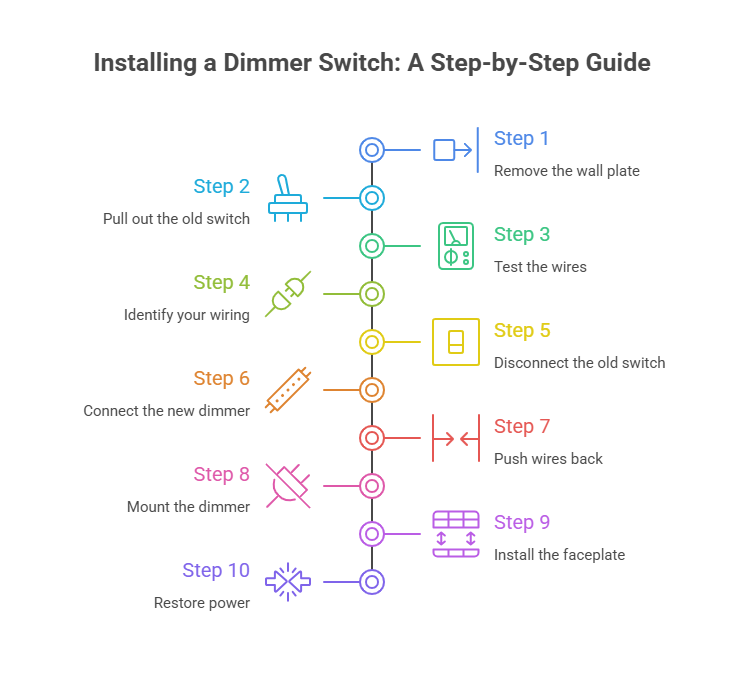
OLet’s break the whole install into simple steps. Clear steps keep you from rushing past anything important.
- Restore power. Flip the breaker on and run the dimmer through its full range. Start low, bring it up slowly. Watch for flicker, buzzing, or delay. Smooth from 0 to 100 percent? You’re done. That’s it.
- Remove the wall plate. Loosen the screws, lift the plate away, and set it somewhere safe. If it’s painted to the wall, score the edges with a utility knife first. Don’t force it or you’ll crack the drywall.
- Pull out the old switch. Two screws usually hold it. Remove them and tilt the switch outward so you can see the wires. Pull gently. The slack behind is limited. Good moment to take that photo we mentioned.
- Test the wires. Use a non-contact voltage tester to confirm the circuit is dead. Test each wire, including the ones in the back of the box. Hear a beep? Back to the breaker. Test twice. Testers are cheap. Mistakes aren’t.
- Identify your wiring. Look for hot, load, ground, and possibly neutral. In most Canadian homes that’s black (hot), black or red (load), white (neutral), and green or bare copper (ground). Two black wires with no markings? Use a multimeter, or check your photo. If the wiring looks unfamiliar or there are more wires than expected, that’s your sign to call a licensed electrician.
- Disconnect the old switch. Loosen each terminal and unhook the wires. Straighten the loops with pliers. If the old switch used push-in (backstab) connections, press the release tab or cut and strip a fresh 15mm of copper.
- Connect the new dimmer. Match hot to hot, load to load, ground to ground, and neutral if required. Most dimmers come with wire leads, so you twist the dimmer’s lead onto the matching house wire and cap it with a connector. Twist firmly. Give each one a gentle tug. A loose connection causes flickering or buzzing. If your dimmer has a green wire, that’s the ground. Connect it every time. Skipping the ground is a code violation in Canada.
- Push the wires back. Fold them into the box so nothing’s under strain. Don’t just shove everything in. Connectors toward the back, dimmer slides in without pinching. A cramped box is a fire hazard over time. Too tight? The box might be undersized. Dimmers are bulkier than toggles.
- Mount the dimmer. Align it, tighten the screws, keep it level. Most dimmers have slotted screws so you can straighten a slightly crooked box. Take the extra 30 seconds. A crooked dimmer bugs you every time you walk past.
- Install the faceplate. Quick step, but it makes everything look clean. Use the plate that came with the dimmer. Dimmer plates have a wider opening for the slider or knob.
How Do You Install a 3-Way Dimmer Switch?
A 3-way dimmer connects one light to two switch locations. The key difference from a single-pole setup is the common wire and two travellers. Label every wire before removing the old switch – this one step prevents 90% of 3-way installation problems.
3-Way Dimmer Switch Wiring Overview
A 3-way setup includes:
- Common wire (usually marked or on a different-coloured screw)
- Two traveller wires (carry signal between switches)
- Ground wire
Here’s the quick version:
- Label wires before removing old switch
- Connect common to dimmer’s black lead
- Connect travellers to the dimmer’s two traveller terminals
- Connect ground
- Reassemble and test
That’s the whole trick. And remember: only one of the two switches becomes a dimmer. The other stays a standard 3-way switch.
Do I Need an Electrician to Install a Dimmer Switch?
For a simple switch-for-switch swap, most Canadian homeowners can do it themselves on their own property without a permit. Turn off the breaker, test the wires, follow the steps.
You do need a licensed electrician when the job goes past a basic swap. That means adding new circuits, running new wiring, changing the panel, or working with wiring you can’t identify. The Electrical Safety Authority (ESA) in Ontario oversees these rules, and other provinces have their own.
For commercial buildings, rental units, and multi-unit properties, a licensed electrician is the norm. Contractors handling those jobs usually source dimmers and LED fixtures wholesale to keep project costs down.
Not comfortable inside an electrical box? Hire a pro. A typical dimmer install runs $50-100 for labour. Small price for peace of mind.
What Mistakes Do People Make When Replacing a Light Switch With a Dimmer?
The most common mistake is using non-dimmable bulbs, and it accounts for the majority of flickering complaints. Here’s the full list of things that go wrong:
- Using non-dimmable bulbs – check packaging before buying
- Overloading the dimmer’s watt limit – add up all bulbs on the circuit
- Mixing up hot and load wires – causes intermittent operation
- Forgetting the ground connection – code violation in Canada
- Ignoring buzzing or flicker – usually a compatibility issue, not “normal”
- Installing the wrong dimmer type – single-pole in a 3-way circuit won’t work
- Not tightening wire connectors – loose connections cause arcing
Most of these take 30 seconds to avoid. Just slow down and double-check.
How Does LED Dimming Save Even More Energy?
LLEDs already use at least 75% less energy than incandescent bulbs (U.S. DOE, 2025). True. But dimming stacks more savings on top.
When you dim LED lights:
- Wattage drops proportionally
- Heat output drops
- Bulbs last longer from reduced thermal stress
- Overall energy draw shrinks across the circuit
The North American LED lighting market reached USD 25.21 billion in 2025 (Mordor Intelligence, 2025), and dimming is a growing part of that. Makes sense. Why run full power when half will do?
Updating several rooms? Most LED lighting upgrades pay back within 1 to 3 years depending on usage and local rates. Provincial rebate programs can shorten that even more. Solid ROI. Want the bigger picture? Here are the advantages of dimming switches.
Troubleshooting After Installing Your Dimmer Switch
Let’s be honest. Sometimes things act up.
If the lights flicker:
- Adjust the low-end trim
- Replace incompatible bulbs
- Check for loose connections
Still flickering? Our guide on why LED lights flicker covers every cause and fix.
If the dimmer feels hot:
- Check the wattage load
- Make sure there’s airflow around the box
- Consider a higher-capacity dimmer
If nothing turns on:
- Wrong wire on the common terminal
- Breaker issue
- Loose connector
Not worth stressing about. Follow the steps calmly.
Can I Install a Dimmer Switch Myself?
Yes, if you turn off the breaker, test the wires, and follow the wiring steps carefully. Curious how long your new setup will last? Dimming actually helps, and our guide on how long LED bulbs really last explains why reduced heat extends bulb life.
FAQ: Dimmer Switch Installation
1. What’s the easiest way to learn how to install a dimmer switch
Honestly, the simplest way is to follow a clear step-by-step guide and take your time. Shut off the breaker first, confirm the wires are dead, then match each wire to the correct terminal on the dimmer. Most people finish a basic install in about 15 to 20 minutes once they realize the wiring layout isn’t as complicated as it looks. Pretty manageable.
2. How do I know if my home supports a dimmer
If you already have a standard toggle switch on the wall, chances are you can replace that light switch with a dimmer. The only thing to double-check is whether your wiring includes what the dimmer requires. Some dimmers need a neutral wire, some don’t. So a quick look inside the box usually answers the question.
3. Can I install a 3 way dimmer switch without experience
Yes. You don’t need a professional background for a three-way setup, but you do need to label wires before disconnecting anything. That one step saves headaches later. Match the common wire correctly, connect the travelers, and the switch usually works on the first try. Not complicated once you see it.
4. Why do LEDs flicker on dimmers
Most flicker comes from compatibility problems. Either the dimmer isn’t LED-rated or the bulbs aren’t dimmable. Same issue in many homes.
5. Do dimmers save energy
Absolutely. When lights run at lower brightness, wattage drops. Pair that with LED efficiency and the savings stack up fast.
Wrapping Up Your How to Install a Dimmer Switch Project
Now you’ve got the full walkthrough on how to install a dimmer switch, plus how to install a 3-way dimmer switch, the tools, the wire-by-wire connections, the 2-wire and no-ground scenarios, mistakes to avoid, and the comfort upgrade you’ll notice right away.
Need help choosing dimmers, LED fixtures, or a lighting upgrade for a bigger project? Contact Votatec and we’ll help you spec the right gear.